English
English
Choose which AI replies wait for an OK: nothing, prices only, or every reply. The customer reads one short holding line, and your sales team sends, edits or discards the draft right from the ticket.
"How much is a kilo of Malang apples? Can you do better if I take 50 kilos?" For a lot of shops, that price isn't just a number on a list: stock moves, regulars get a better deal, and only sales may give a discount. ACC sales is built for that moment. The AI still works fast, finds the product and drafts the answer, but the number only reaches the customer once one of your people says OK. A price is a promise, and we think a promise should come from someone who can keep it.
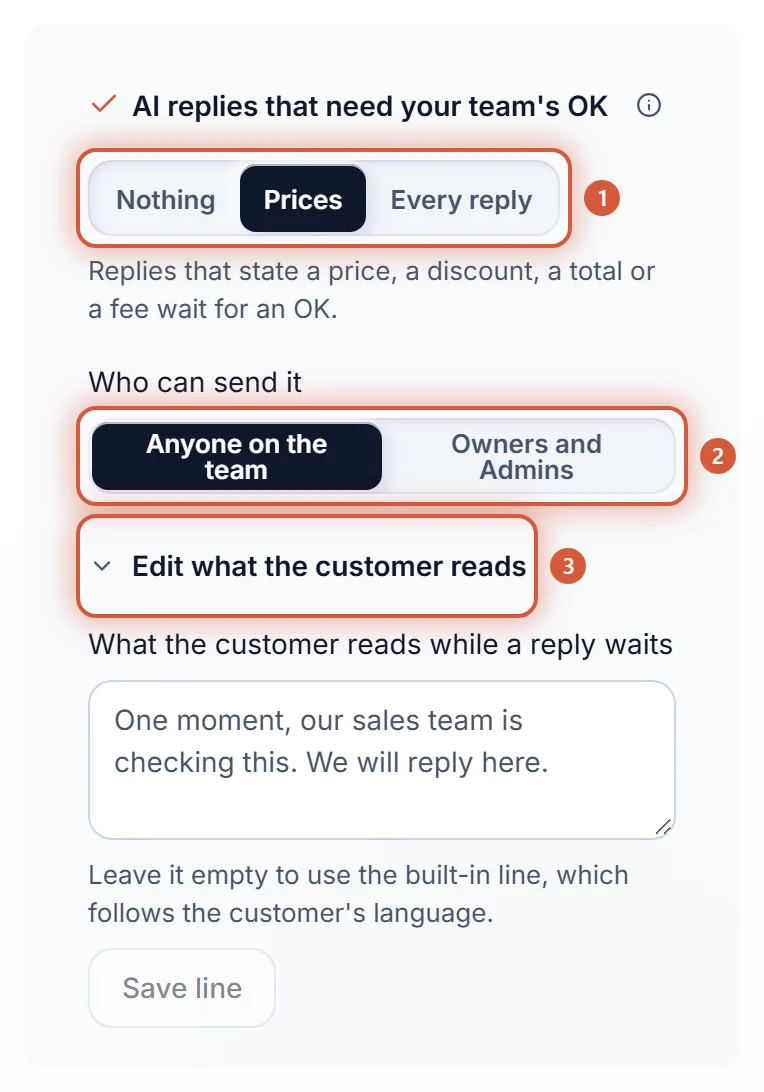
Only Owners and Admins can change this card. An Agent sees a note that only Owners and Admins change sales settings.
| Option | What it means |
|---|---|
| Nothing | The default. The AI answers on its own, nothing waits. |
| Prices | Replies that state a price, a discount, a total or a fee wait for an OK. Everything else goes out straight away. |
| Every reply | The AI drafts every answer, and your team sends it. |
| Who can send it: Anyone on the team | The default. Every teammate can send, edit or discard a draft. |
| Who can send it: Owners and Admins | Only Owners and Admins. Agents can still read the draft. |
| Edit what the customer reads | The line the customer gets while a reply waits, up to 300 characters. Leave it empty for the built-in line, "One moment, this is being checked. I'll reply here.", which follows the customer's language. Your own line goes out exactly as you wrote it. |
Who can send it and Edit what the customer reads only show when something waits, so with Prices or Every reply.
If the AI isn't sure whether its reply states a price, the reply waits too. A slightly slower answer beats a price that slipped out unchecked.
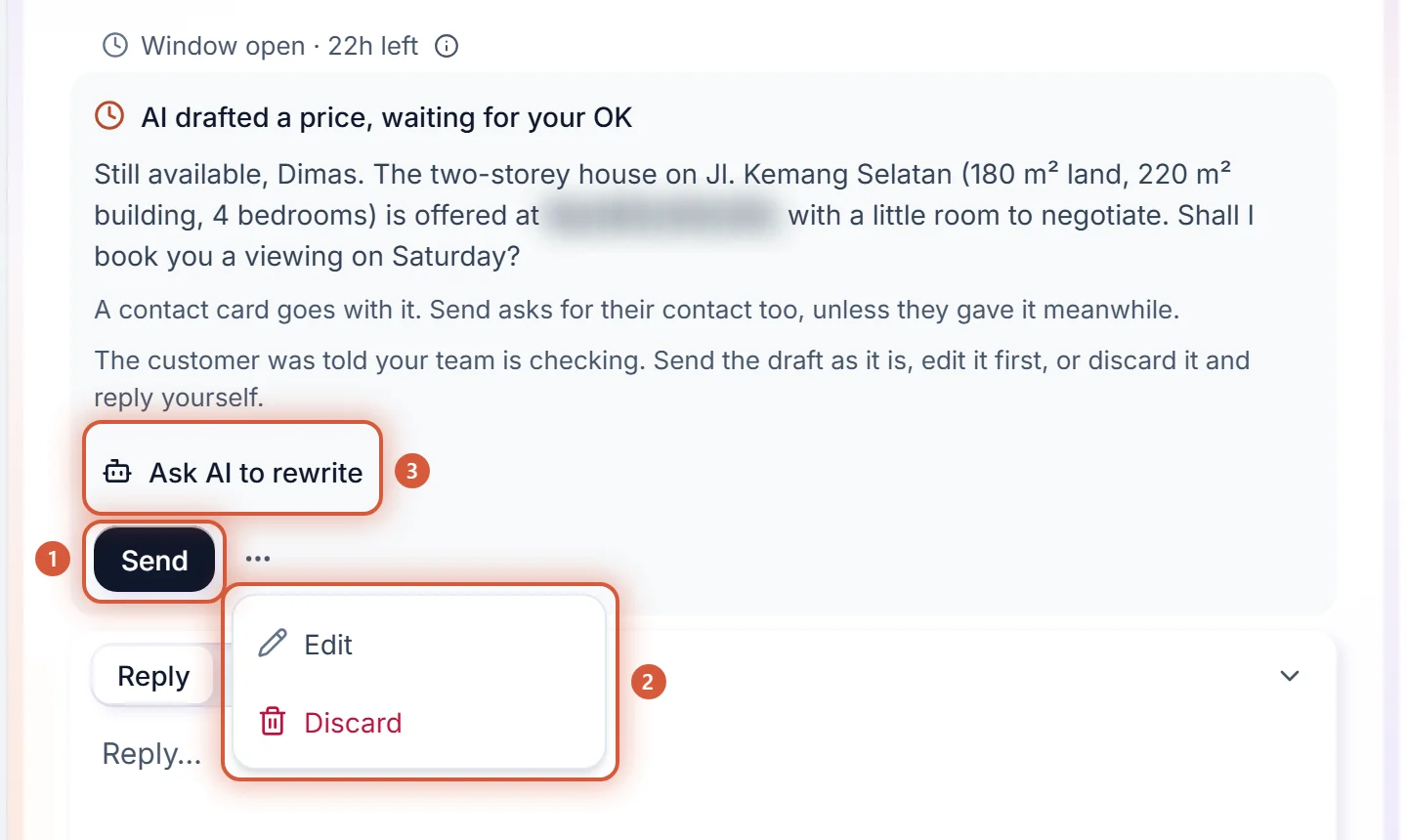
The block's title is AI drafted a price, waiting for your OK, or AI drafted a reply, waiting for your OK when every reply waits. Under it sit the draft's text, the buttons that go with it (Buttons with it: ...), a line when a form or a contact card goes with it (A form goes with it. Send sends the form too.), and the actions:
| Action | What happens |
|---|---|
| Send | The draft goes to the customer as it is, exactly once. Two clicks or two tabs still make one message. |
| Edit (three-dot menu) | The draft's text opens in place. Change it, then press Send edit, or Cancel edit to go back. The text is 1 to 1024 characters. |
| Discard (three-dot menu) | Nothing is sent. Reply yourself in the reply box when you're ready. |
When your workspace hides customer contacts from Agents, an Agent sees the phone numbers and email addresses in a draft hidden, just like in the chat, and gets no Edit: an edit would start from the hidden text. Send still sends the draft exactly as the AI wrote it.
After Send you'll see Sent to the customer. If the channel refuses it, the notice reads Saved, but not delivered yet. Check the message in the chat., and the reply in the conversation shows the reason with Send again. The customer gets the draft as the AI's reply, not under your name.
Rather write the answer yourself? Press Discard first, then reply in the reply box. Your reply takes the ticket over from Kira, as always (see Taking over a conversation).
With Owners and Admins, an Agent reads the draft with the line Only Owners and Admins can send this draft. and no buttons. When KIRA support looks at a ticket with your permission, they see the draft read only, with no buttons.
Sometimes the draft is almost right, but the AI didn't know today's price or that the stock is back. Instead of rewriting the whole message, tell it in one line:
Nothing reaches the customer while the AI rewrites: they don't get the holding line again, and the new draft still waits for your OK, whatever the AI replies that need your team's OK card is set to. Kira uses your line for this one rewrite only. It doesn't go into your Knowledge, and later replies don't read it, so a price that holds from now on belongs in your price list (see Price lists for the AI).
The queue message sent when a chat is handed over, follow-ups, appointment confirmations from the calendar, and the safety message for someone in danger never wait for an OK.
We don't want an AI deciding prices on its own when your business decides them through people. But we don't want a customer left in silence while a salesperson finds their phone either. So the AI does everything it can, the customer knows right away that someone is checking, and your person presses one button. Waiting makes answers slower, which is why nothing waits until you choose it yourself.