English
English
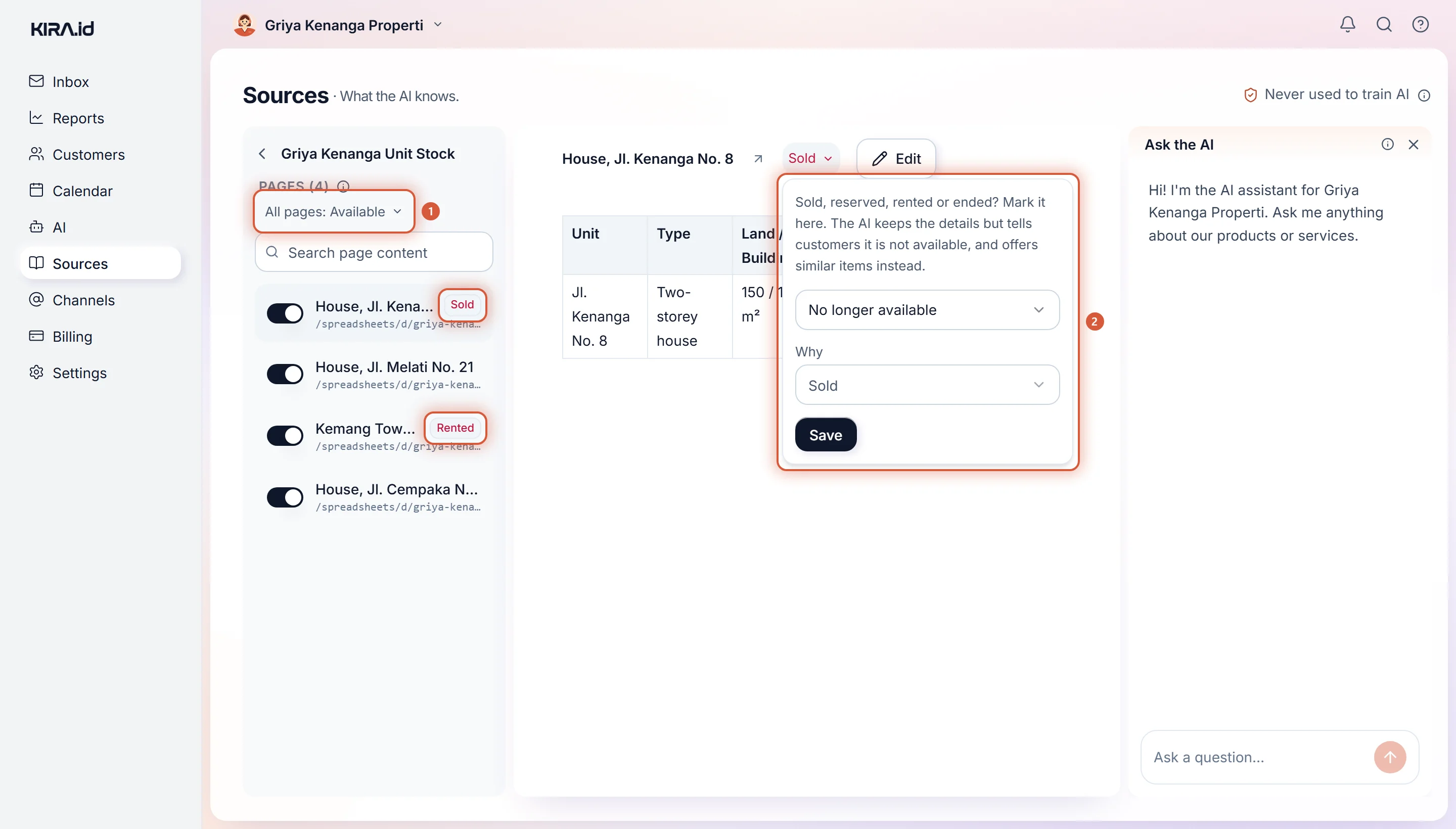
Mark a source or a single page as sold, reserved, rented or ended, now or on a date. The AI still knows it, tells customers it's not available, and offers similar ones instead.
The type 45 house in block C sold last Tuesday. On Thursday night a buyer asks: "Is the block C one still available?" Delete the listing and the AI answers "I don't have any information on that unit", and the buyer is left confused. Leave it in and the AI offers it. Both are bad. A good agent says, "That one's sold, but there are two similar units in block D," and that's the answer KIRA.id is built to give.
This page covers the Availability control in Sources: for listings that sold, got reserved or got rented, promos that finished, and anything else that stops being available.
| Choice | What it means | What you fill in |
|---|---|---|
| Available | The default. The AI offers it as usual. | Nothing |
| Available until a date | Available to the end of the Last available day, in your business's time zone, then it stops on its own. Made for promos with an end date. | A date (today or later) and Why, which starts on Ended |
| No longer available | Stops right now. | Why, which starts on Sold |
Why offers Sold, Reserved, Rented, Ended or Other, and the AI uses it when it answers: a Rented unit is called rented, an Ended promo is called ended. Other just means no longer available.
Reserved is for a unit under offer, say with a deposit paid: the AI says it's already reserved and can't be offered right now, never that it's gone for good. If the deal falls through, mark it Available again and the AI offers it as before.
The stricter mark wins. A page counts as no longer available when its own mark or the All pages mark says so, and whichever date comes first applies. So to offer one page again under All pages: Sold, change the whole-source mark first. While some page has its own mark, the whole-source control reminds you: A page with its own mark ends at whichever comes first: its own mark or this one. To clear a mark, pick Available and Save.
Only Owners and Admins can change availability. Other roles see the marks only.
Once something is no longer available, the AI still knows the details, but it:
When a customer asks about the marked item itself, the reply is a fixed line, not words the AI makes up, so it can never slip into "still available". An example, for an invented property agency:
Customer: Is the 3-bedroom house on Jalan Kenanga still available?
AI: Sorry, Rumah Jl. Kenanga No. 8 is no longer available (sold, since 4 Nov 2026). Rumah Jl. Melati No. 3 is still available.
The line names the page or Sheet tab you marked, so give each listing a clear title, such as the unit's address. For a Reserved unit it reads: "Sorry, Rumah Jl. Kenanga No. 8 is already reserved (since 4 Nov 2026), so we can't offer it right now." If the same message also asks something else, such as your opening hours, the customer gets this line first and the AI answers the rest when they ask again.
A customer who comes from an ad often writes only "still available?". Until the AI first answers from your sources, it also searches them for that ad's headline, so the advertised unit is still found, and if it is sold, the fixed line above answers.
Until its date passes, something marked Available until a date is offered as usual.
| The page or source switch turned off | Marked as no longer available | |
|---|---|---|
| The AI knows the item | No | Yes |
| A customer who asks gets | "I don't have any information on that" | "It's sold, here's a similar one" |
| Use it for | Content that's wrong or must never be used | Sold listings, rented units, finished promos |
A page that's switched off isn't used at all, even when it carries an availability mark. How to switch off a source or a page is in Managing sources.
If your unit stock lives in a Google Sheet, there are two ways:
Sold. The AI reads that row and treats it as sold, just like a mark.The second way relies on the AI reading your sheet, so write the status clearly and in the same column on every row. The Sheet updates on its own a short while after you stop editing it; press Regenerate in the source's menu if you need it right now. See Google Docs, Sheets and Slides.
| Where | What shows |
|---|---|
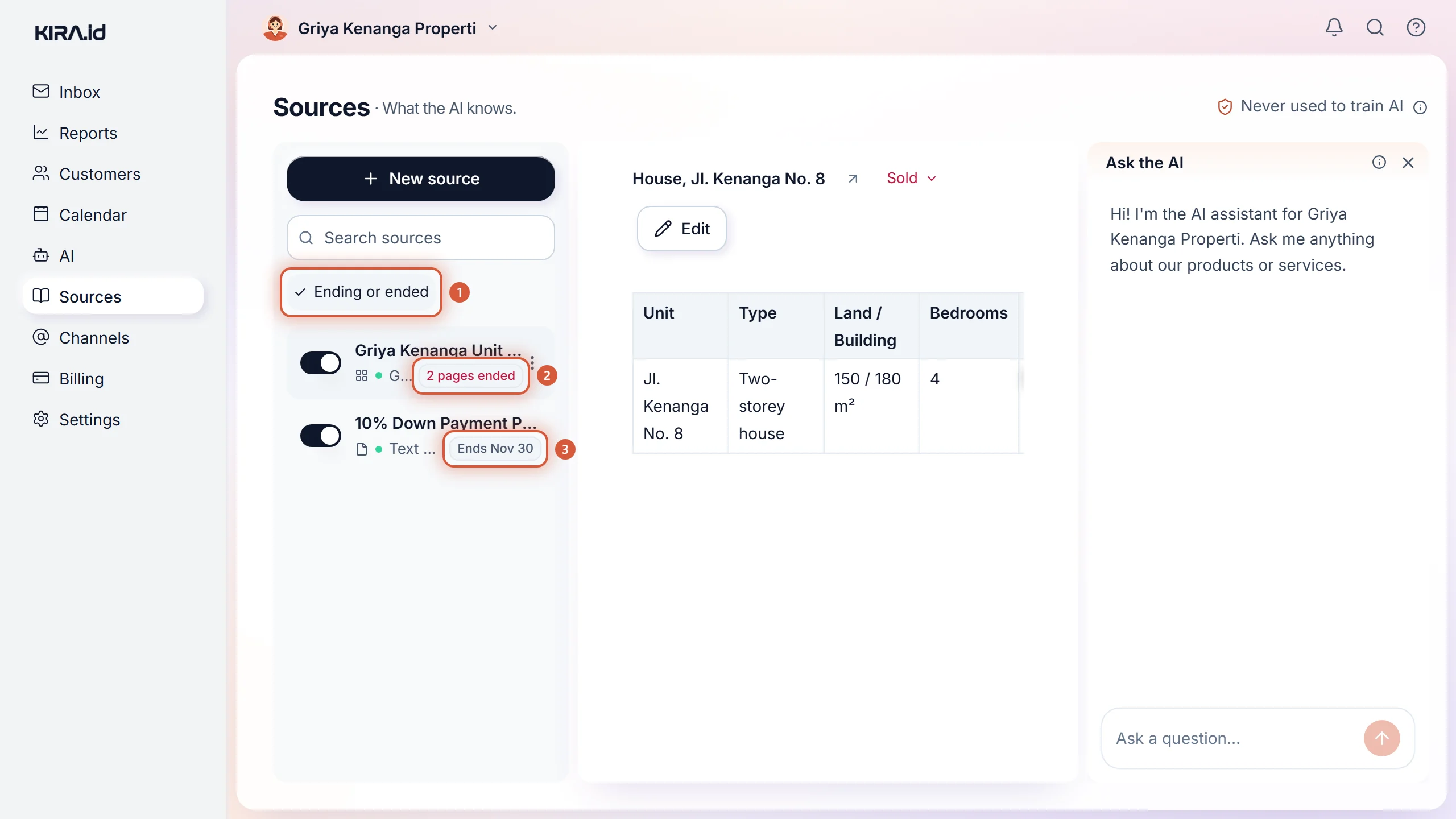
| A page row | Its own mark: Sold, Reserved, Rented, Ended or Unavailable once it stopped, or Ends 12 Nov while the date is still ahead |
| A source row | The whole-source mark when there is one, otherwise its pages, such as 2 pages ended or 1 page ending |
A mark that has stopped shows in red; a date still ahead shows in grey.
To see them all at once, press Ending or ended under the source search box. The filter appears while any source has a mark, and keeps the sources with any mark at all, however long your source list is.
Deleting a sold listing feels tidy, but it makes the AI play dumb, and the customer feels brushed off. A real salesperson doesn't do that: they remember the unit that sold, say so honestly, and show you what else there is. So we keep the item, tell the AI it's gone, and let the date do the rest. A Lebaran promo that ends itself at midnight is a lot more restful than a reminder in your calendar.