Skip to content

Guide 114 of 1698 min read

The Sales report: how your leads are doing

The Sales tab under Reports: how many chats wanted to buy, what happened to them, how fast they got a reply, follow-ups, and replies held for an OK. How each number is counted, and what is left out on purpose.

Your ads are running, WhatsApp is busy, and the team feels flat out all day. But how many people actually bought, and the ones who didn't, where did they go? The Sales tab answers that on one screen. We made it honest to the point of plain: a vendor pitching to you isn't counted as a lead, no percentage dresses up the result, and nearly every number opens the chats behind it.

The tab sits in Reports, last in the strip after Team, under the heading How your leads are doing.
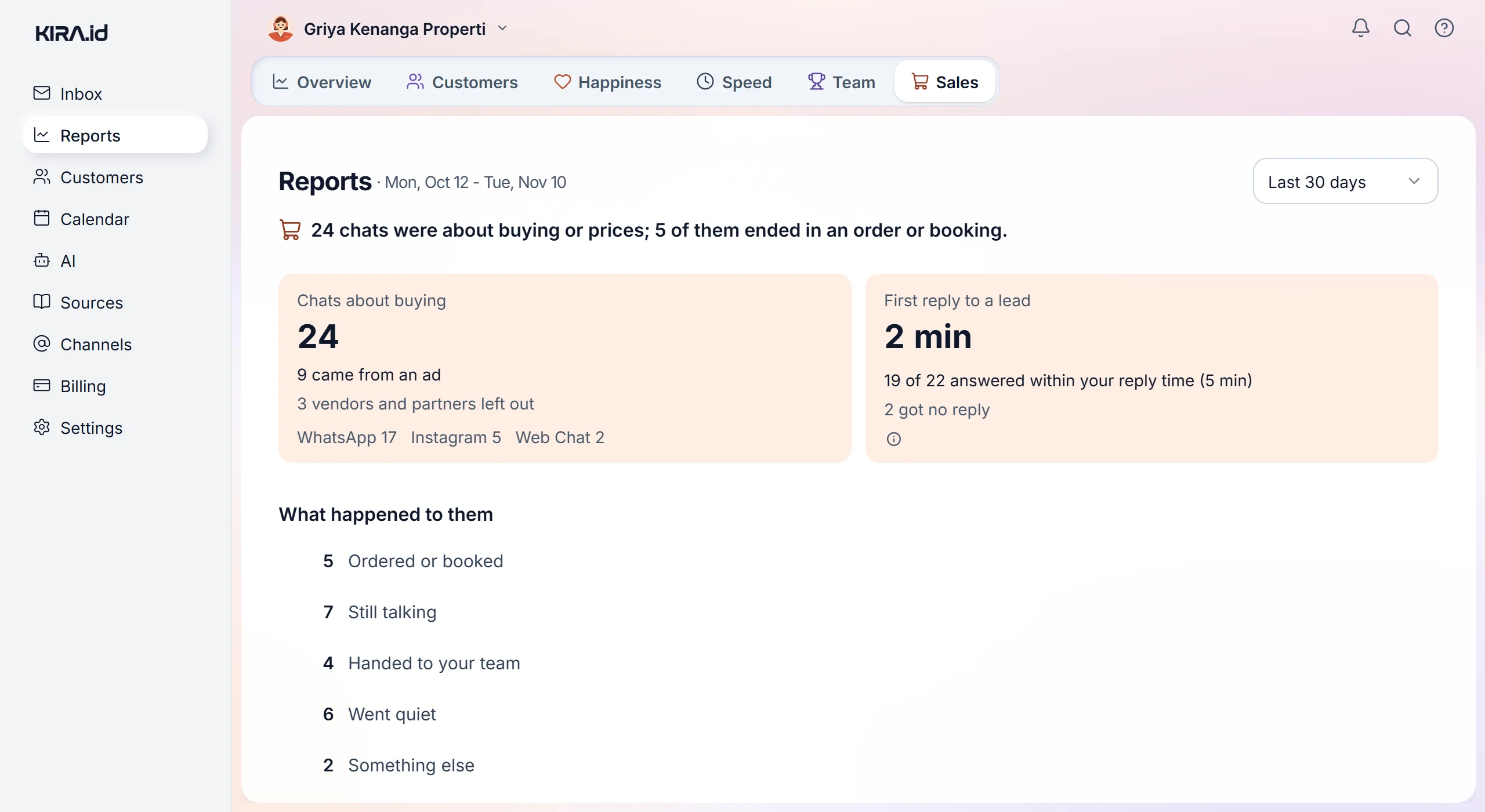
Reports, the Sales tab from the top: the opening line, Chats about buying with the came from an ad line and the per-channel counts, First reply to a lead, and What happened to them

Reading the tab from the top ​

  1. One sentence, such as 12 chats were about buying or prices; 3 of them ended in an order or booking. No leads in those days? It says Nobody asked to buy or about prices in these days., and nothing else, unless a quiet-lead follow-up was due or a reply was held for your OK: those boxes still show under it, so a reply waiting for you is never hidden.
  2. Chats about buying: your number of leads. Under it, when there are any, 4 came from an ad and 2 vendors and partners left out, then the leads per channel (say WhatsApp 9, Web chat 3) when they came on more than one channel.
  3. First reply to a lead: how long a lead usually waited for their first reply, then 9 of 12 answered within your reply time (5 min) and 1 got no reply. The info icon beside it explains how it's counted.
  4. What happened to them: one line per outcome, with its count.
  5. Your labels: the labels you made under Settings → Sales, on the Incoming chat rules card, most used first, at most five. It only shows when a label was applied. Not a buyer labels aren't listed, because their chats are left out.
  6. Your ads: which ads brought your leads, most first, at most five. Each line has the ad's headline (or Ad with its ad number when the ad had no headline), its number of leads, and how many ordered or booked. Click the headline to open those chats in the Inbox. It only shows when a lead came from an ad.
  7. Quiet leads followed up and Replies held for an OK: each one only shows when your business uses it.

The range is the same as on every tab: 7, 30 or 90 days. Everyone on the team who opens Reports sees the same numbers; nobody on the team is named on this tab.

Who counts as a lead ​

One lead is one chat opened in the range whose topic the AI read as Pricing or Ready to buy, two topics your Inbox also starts with as lists. It's the same group as Buyers on the Customers tab, so the two tabs never disagree.

  • It counts chats, not people. One person who asks about prices in two separate chats counts twice.
  • Vendors and partners are left out. A chat marked Not a buyer by a chat content rule or a number rule under Settings → Sales (the Incoming chat rules card) is out of every number on this tab, and the count is said once, on the vendors and partners left out line.
  • Chats you shut out are left out. A chat the Spam closes the ticket rule closed, or one closed because its number is muted, isn't a lead. If the chat is opened again, or someone presses Mark as buyer on it, it counts again.
  • Test chats and deleted tickets are left out, as on every tab.
  • Came from an ad counts chats opened from a Click-to-WhatsApp, Click-to-Messenger or Instagram ad. Under Your ads, each chat counts under the ad that brought it to that chat, so an older chat never moves to a newer ad the same person clicked later.

What happened to them ​

Each chat is counted once, in the first line from the top that fits, so the lines always add up to the big Chats about buying number. A line with zero isn't shown.

LineWhat it means
Ordered or bookedThe customer ordered in the chat and the AI passed the order to your team, or an appointment was booked and not cancelled. It also counts when the same customer orders or books in a new chat within a week.
Still talkingThe chat is still open or waiting on the customer.
Handed to your teamThe chat is finished and went through your team: handed to the queue or taken over by someone.
Went quietThe chat ended because the customer stopped replying. A chat that reopened and then ended another way isn't here.
Something elseThe chat ended some other way.

The words on each line are a link: tap them and the Inbox opens exactly those chats. Past 100 it says opens the newest 100. A label's name under Your labels works the same way.

One honest caveat: an order in a new chat only links up when KIRA.id knows it's the same person. A web chat visitor who comes back from another browser, or moves to WhatsApp, is a new customer until the two records are combined, so Ordered or booked can read a little low, never high. See Duplicate customers.

First reply to a lead ​

It's measured from the customer's first message to the first reply they saw, from the AI or from your team. An internal note, a message the channel refused and a removed message aren't replies.

  • The big number is the median: how long a lead usually waits. One forgotten chat can't drag it up.
  • It runs on the clock, nights and weekends included, because a buyer who writes at 11 pm is still waiting. The Speed tab counts in opening hours, because it judges your team's shift. So within your reply time can read lower here than on the Speed tab, even with the same reply time.
  • Your reply time is the one you set for your team. See Response times.
  • Too few answered leads to judge yet (2) shows until enough leads have had a reply. None at all? No lead has a reply yet.
  • 1 got no reply means the customer wrote and nobody answered: a lead still waiting, or one that closed without a reply.

With ACC sales on, the holding line doesn't count as the first reply. It only tells the customer an answer is coming, so the wait runs until the real answer is sent. How long the draft waited for its OK is in the Replies held for an OK tile.
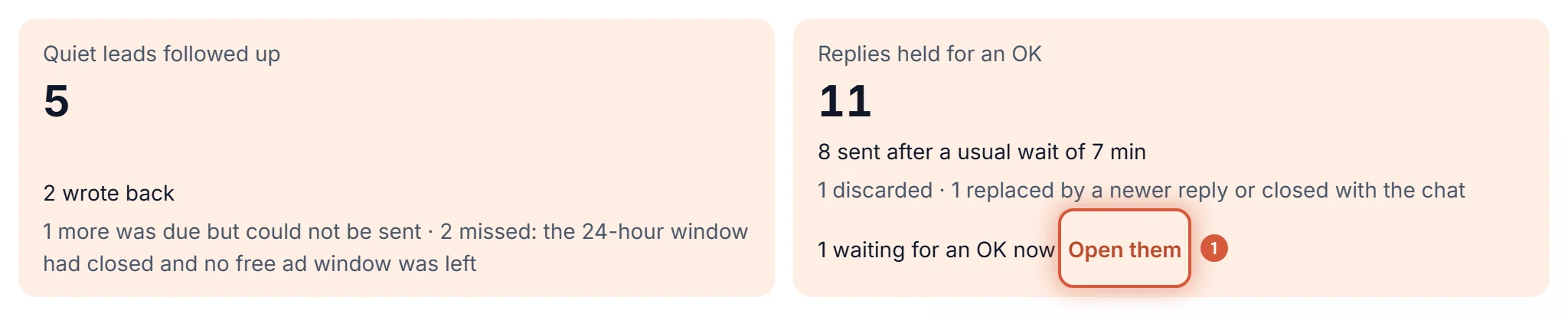
Follow-ups and replies held for an OK ​

The Quiet leads followed up tile with its wrote back, could not be sent and missed lines, and the Replies held for an OK tile with the Open them link beside the one still waiting

Quiet leads followed up shows when the follow-up option for leads is on, or a follow-up was due in the range. See Following up quiet customers.

  • The big number: follow-ups sent.
  • 3 wrote back: customers who wrote again after the follow-up.
  • 1 more is still on the way: follow-ups that are due and about to go, for example while KIRA.id checks Meta's WhatsApp usage figures. They usually go on the next round.
  • 1 more was due but could not be sent: follow-ups that were due but didn't go out, for example because the month's free WhatsApp messages had run out, or the customer wrote first.
  • The follow-up is off now: the option, or follow-ups as a whole, was switched off after some went out.

This follow-up also greets ad chats that turned out not to be about buying, so the tile can count chats that aren't in Chats about buying.

Replies held for an OK shows when ACC sales is on, or a reply was held in the range, or one is still waiting.

  • The big number: replies held in the range, in any chat, not just leads.
  • 5 sent after a usual wait of 12 min: how many went out, and the median wait until someone pressed Send.
  • 1 discarded: drafts thrown away without being sent.
  • 2 waiting for an OK now, with Open them: everything still waiting right now, whenever it was held. Open them opens the Inbox with the Waiting for OK chip on.

What this tab leaves out on purpose ​

  • Revenue, deal value, funnels and win rates. KIRA.id doesn't record what a deal is worth or what stage it's in, and we won't guess. Every number here is something that really happened in a chat.
  • Numbers per salesperson. Who answers how fast lives on the Team tab. See Your team's reply speed.
  • Charts and Go deeper. Every tile is a count or a single median. A chart drawn from one number is decoration.

Why we built it this way ​

Sales dashboards full of funnel charts look clever, but their numbers are often counted in ways you can't check. We went the other way: chats, not estimates; vendors left out, because a stone supplier pitching to you isn't a lead; the plain clock, because a buyer who writes at night really is waiting; and every outcome opens its chats. A number you can't open is a number you have to take on faith, and we don't want to ask that of you.