English
English
KIRA reads your team's replies to customers and uses standing facts about your business on its own. Your Knowledge always wins, and anything can be undone or removed.
Your team has answered the same questions hundreds of times. "Do you deliver to Bogor?" "How many days ahead do I order a birthday cake?" "Can you write a name on it?" The answers live in your WhatsApp chats, and none of them ever made it into Knowledge. It's a shame when the AI says "I don't have that information" about something your team knows by heart.
Learning from your chats lets KIRA read your team's own replies and write facts about your business into one source called From your chats. You're busy, so we don't hand you a list to tick. Instead we're strict about two things: KIRA only uses standing facts about your business, and what you wrote yourself always wins. Anything it uses, you can undo, edit or remove at any time.
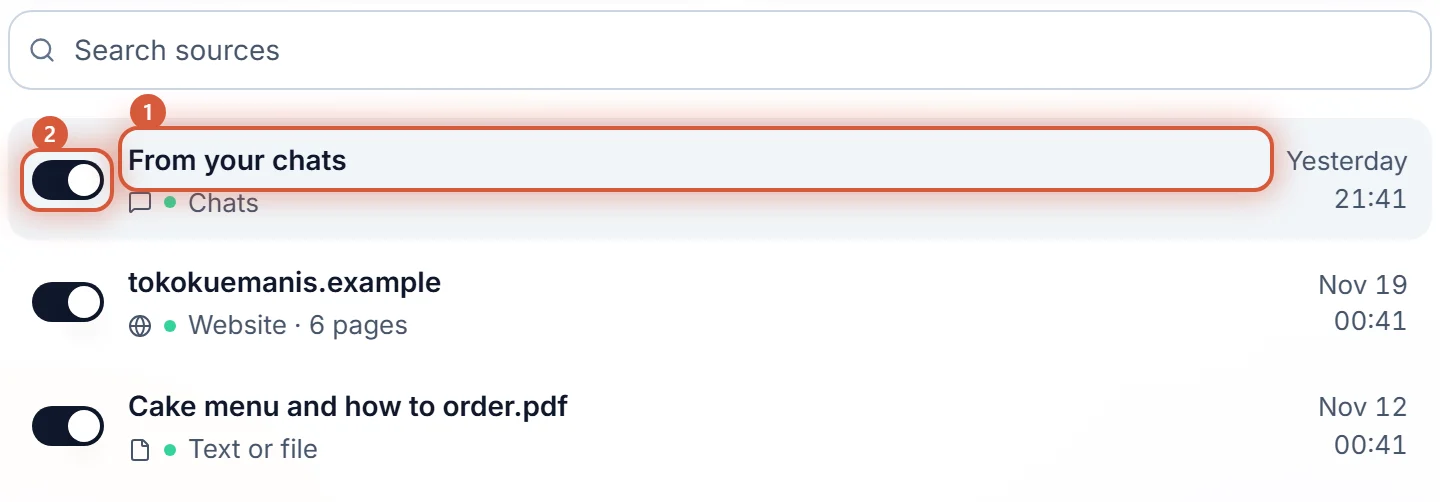
This is on for every workspace. The From your chats row is in Sources from the start, even before anything is learned, and the From your chats tab in New source opens it. You choose which channels KIRA reads, one switch per channel.
Whatever it learns stays in your workspace. No AI model is trained, and nothing is used for any other business. More in Your data stays yours.
Every new fact is checked first. KIRA uses it on its own, without waiting for you, when it is:
What passes goes live straight away and shows under Recently learned. What doesn't isn't used, and we don't show it either, because there's nothing for you to decide. With one exception: when your team answered differently in chat than your Knowledge says, KIRA tells you above the lists of facts. Your Knowledge may simply be out of date.
Open Sources, then From your chats. It only shows the parts that have something in them:
| Part | What it shows | What you can do |
|---|---|---|
| Reply style | One line, KIRA updated how it replies from your chats, when a reply style was applied (see below) | Undo |
| Your Knowledge may need an update (N) | Above the lists of facts, only when there is one: an answer your team gave in chat that differs from your Knowledge | Open your Knowledge, Ignore, See the chats |
| Recently learned | Facts KIRA just started using on its own, with how many chats back them | Undo, See the chats |
| What KIRA learned | Every other fact in use, by topic, with how many chats back it | Edit, Remove, See the chats |
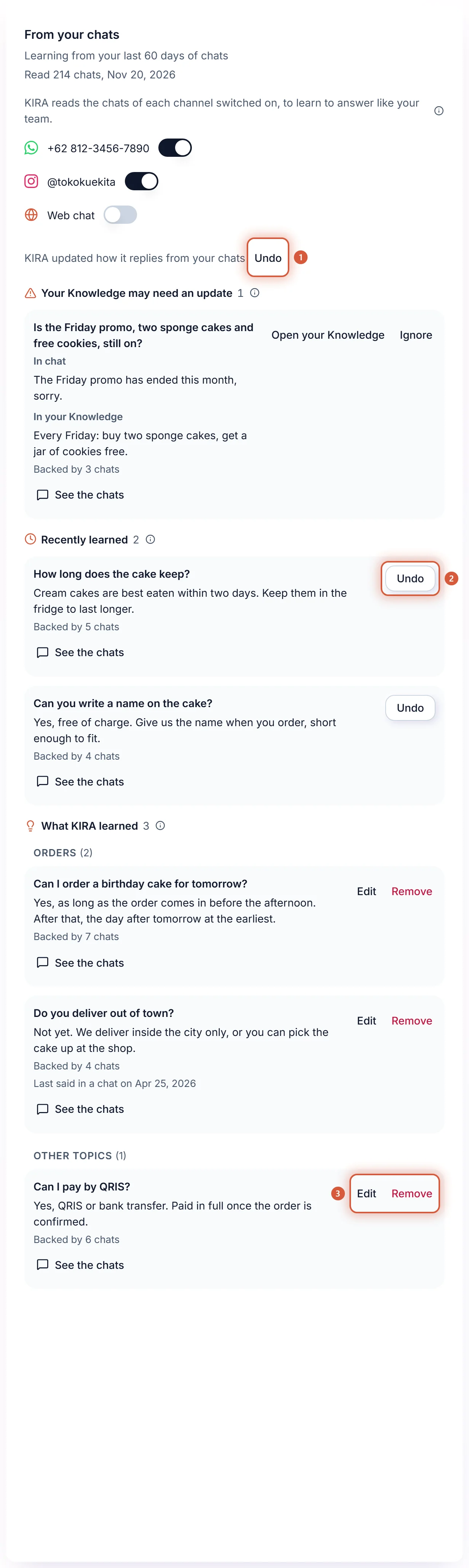
Undo stops the AI using that fact on the spot, and the fact won't come back on its own. Remove under What KIRA learned does the same for older facts. Edit changes the words; your version is what gets used from then on.
Your Knowledge always wins. When your team says something in chat that contradicts your sources, or says something has ended, the AI keeps answering from your Knowledge. But a difference like that usually means one thing: something changed in your business, and your Knowledge didn't change with it. So KIRA puts it above the lists of facts, under Your Knowledge may need an update.
Each item shows the question, In chat with your team's answer, In your Knowledge with the words from your source, how many chats back it, and See the chats.
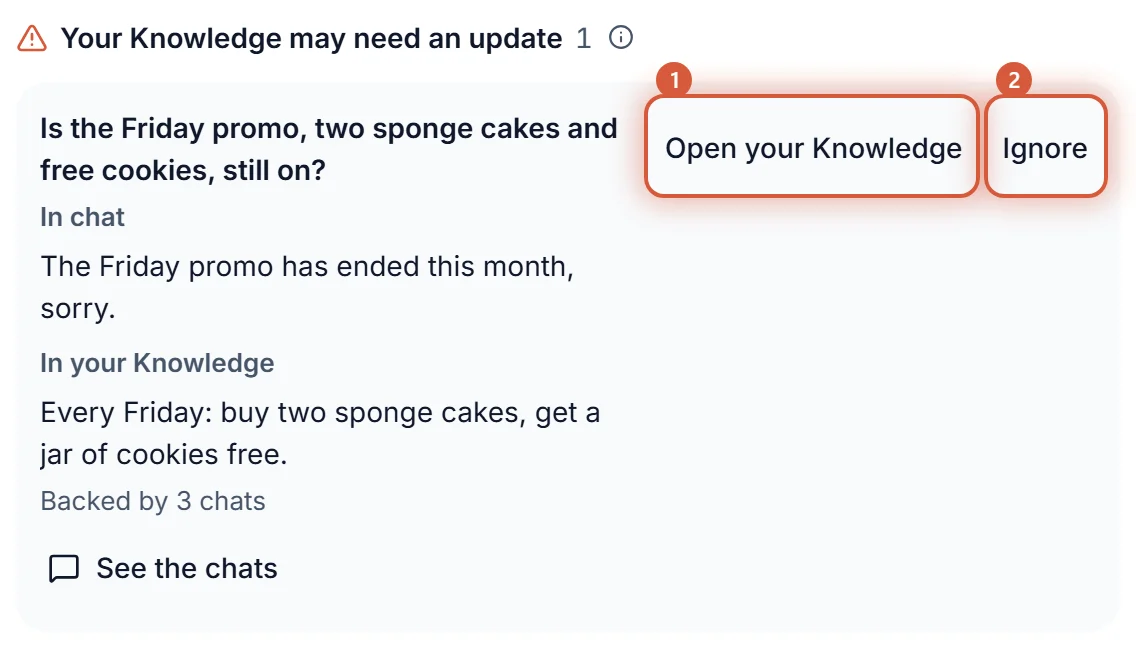
There's no button to use the chat's answer instead, and that's on purpose: two different answers never serve side by side, and what you wrote stays the one to go by. Until you decide, the AI answers from your Knowledge.
Sometimes the AI answers, then someone on your team steps in and says something else in the same chat. Your team's answer wins: if it passes the check, KIRA uses it. If what your team said differs from your Knowledge, it shows under Your Knowledge may need an update like any other disagreement, because what you wrote stays on top. AI drafts your team edited before sending are read too, and KIRA learns only from the part they changed.
A fact doesn't expire just because nobody asked: your Sunday opening hours are still right after a quiet month. A fact that hasn't come up in a chat for a long while keeps being used, and its row says Last said in a chat on that date, so you can judge it at a glance. Edit or Remove it once it no longer holds.
When customers keep asking about one topic's prices, the source shows a card with how many times they asked, and Add a Google Sheet and Upload a file. The price list you keep there is what the AI reads, and it's always the current one. See Price lists for the AI.
When your team sends the same file to many customers from a phone app (WhatsApp Business, Instagram or Facebook), KIRA offers it: You send this file to many customers. Add it to Knowledge? It only offers PDF, Word, PowerPoint, Excel and PNG or JPEG images, one at a time.
A file already in Knowledge is never offered.
KIRA also notices how your team replies: how many messages per answer, short or long, emoji or none, the way you greet people. It copies your team's warmth, length and greetings, but writes words out in full, so "pls" still comes out as "please".
That style goes into the AI profile only where you left it empty. If you wrote how the AI speaks or its instructions yourself, your words win and nothing changes. Once applied, the source shows KIRA updated how it replies from your chats with Undo, which puts the profile back the way it was, as long as you haven't edited the AI profile since. See The AI personality.
Orders always come first. When KIRA finishes reading your chats the first time, only automated senders (codes, notices, broadcasts) get AI replies switched off, once. Friends, family, suppliers and partners are not, because a customer you know can look just like them. A message that is clearly personal to you or your team, with no question or order for the business, gets no AI reply and goes straight to your team. As soon as someone asks or orders, the AI serves them. If you want someone left alone, switch AI replies off in their customer record (Turning the AI on and off).
| You want to | How |
|---|---|
| Stop KIRA reading one channel's chats | Turn off that channel's Learn from chats. It is one switch, shown in that channel's settings under Channels, in Set for all for every channel at once, in Settings > AI, and at the top of From your chats. What it already learned stays until you remove it. |
| Stop the AI using everything it learned | Turn off the From your chats row's switch in Sources, like any other source. The AI stops using it right away, and what it learned is kept. Reading chats stays with each channel's switch. |
| Stop one fact | Undo under Recently learned, or Remove under What KIRA learned. |
| Read your stored chats again | Read again in Settings > AI, or in the Learn from chats part of one channel's settings. KIRA reads the chats it already stores from the channels whose switch is on and puts what it finds in From your chats. One read runs at a time, WhatsApp isn't asked again, and nothing is sent to anyone. |
Don't want KIRA to read any chats at all? Turn Learn from chats off for every channel with Set for all on the Channels page.
When you connect WhatsApp Business for the first time, the Sources step of onboarding shows the card Teach KIRA from your WhatsApp chats. You can skip it.
The AI answers nobody on that number until you turn it on. Pick Later and there's no reminder; switch it on whenever you like from Channels (Turning the AI on and off).
Your customers' data is yours, and KIRA.id processes it for you. If your workspace uses this feature, you can put this in your own privacy notice, as it is or adapted. It's a starting point, not legal advice.
We use KIRA.id to answer customer messages. To keep its answers accurate and in our own style, KIRA.id reads our past one-to-one chats with customers, with contact details hidden, and writes down facts about our business and how we reply. It does not keep your contact details in what it learns, it does not use your messages to train any AI model, and nothing it learns from our chats is used for any other business. You can ask us to delete your data at any time, and we will remove your messages and their links to what was learned.
For customers who read Indonesian:
Kami memakai KIRA.id untuk menjawab pesan pelanggan. Agar jawabannya tepat dan sesuai gaya kami, KIRA.id membaca chat satu lawan satu kami dengan pelanggan, dengan data kontak disembunyikan, lalu mencatat fakta tentang bisnis kami dan cara kami membalas. Data kontak Anda tidak disimpan dalam hal yang dipelajarinya, pesan Anda tidak dipakai untuk melatih model AI mana pun, dan apa pun yang dipelajari dari chat kami tidak dipakai untuk bisnis lain. Anda bisa meminta kami menghapus data Anda kapan saja, dan kami akan menghapus pesan Anda beserta kaitannya dengan hal yang dipelajari.
At first we asked owners to tick every fact before it was used. Then it hit us: business owners don't have time for one more list, and a good fact nobody ticked stays buried in chat history. But we didn't want an AI that inherits every typo, every special deal for one customer, or leftovers from an older business on the same number either. So the check does the work, not you: only standing facts about your business get used, prices are never learned, your Knowledge always sits on top, and every fact traces back to the chats behind it and comes off with one tap.