English
English
Afraid a sales rep will quit and take your customers? Trust and NDAs won't stop it. Let reps sell from the business number without seeing customer numbers.

The surest way to stop sales reps from taking customers is to make sure customer numbers never reach them. Your reps answer every chat from the business WhatsApp number through one shared console. In KIRA.id, an Owner flips a single switch: Agents keep serving every chat, while each customer's full name, phone number, email and username shows up masked on their screen.
Friday afternoon, Rudi says goodbye. Your best salesperson for three years (we made him up, but you've met him): friendly, knows every price, customers love him. Two weeks later, a long-time customer answers your quote with one short line: "Oh, Rudi already sent me a price from his new place."
You read it twice. It isn't quite anger. It's colder than that: the customer list you built with three years of ad spend, stock and salaries was living on one person's personal phone. And that phone just walked out the front door.
Here's where we stand: customers belong to the business, not to whoever happened to answer their first message. The business paid for the ad, stocked the product and took the complaints. And this isn't about distrusting your team. Good reps don't deserve suspicion. What has to go is the temptation, and the argument on the day the job ends.
There's rarely a plan at the start. A customer messages the rep's own number because replies come fastest there, and month by month "the company's customer" becomes "my customer". Then a competitor makes an offer. The usual defences:
Trust matters, but trust isn't a system. What you can control is where a customer's number shows up, and for whom.
Think about the last time you booked a ride. You messaged the driver inside the app, agreed on the pickup spot, finished the trip, and neither of you needed the other's number. Nobody felt distrusted. That's just how it works.
Selling over chat can work the same way. Your reps still talk, pitch and close, in a place the business owns.
In KIRA.id, reps reply from the console, and messages go out from your business WhatsApp number, never a personal phone. Then an Owner turns on one switch:
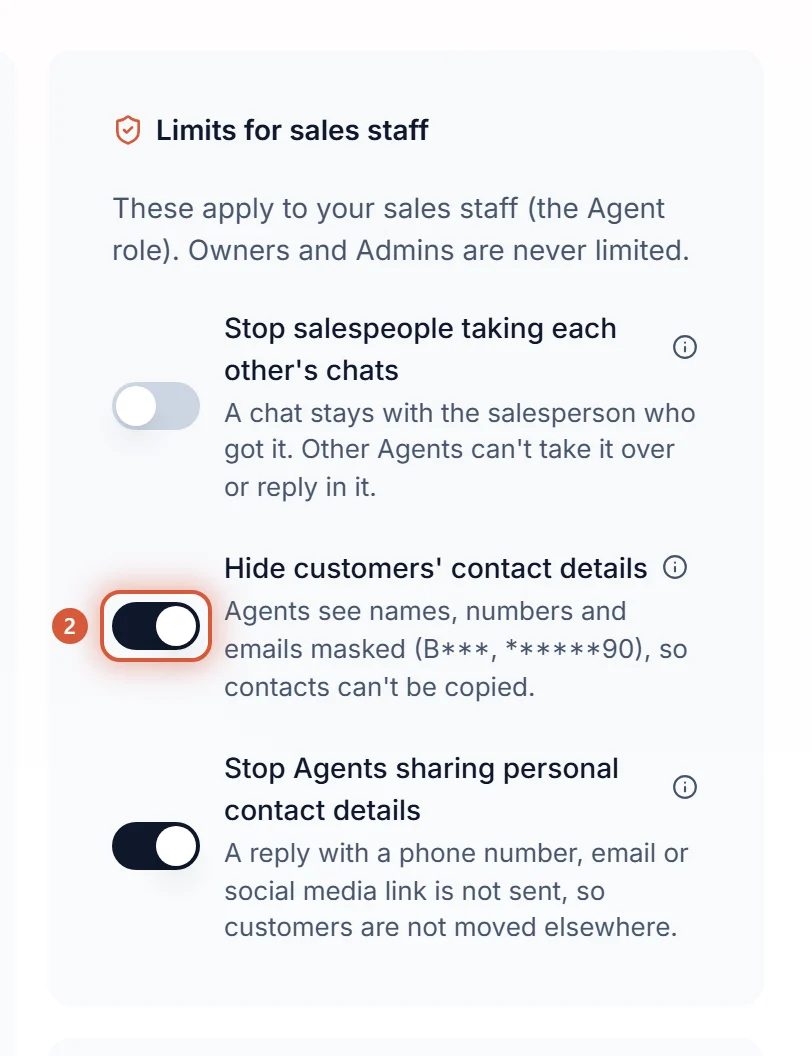
It saves the moment the switch moves. It's off by default, only Owners and Admins can see and change it, and every change is recorded: who made it and when.
From then on, reps with the Agent role keep their full job: reply, take over, resolve, tag, write notes. Only their screen changes:
***********90 and an email like b***@example.com, with a shield mark. No copy button, no Open in WhatsApp, no remove button.Budi Santoso reads B*** S***.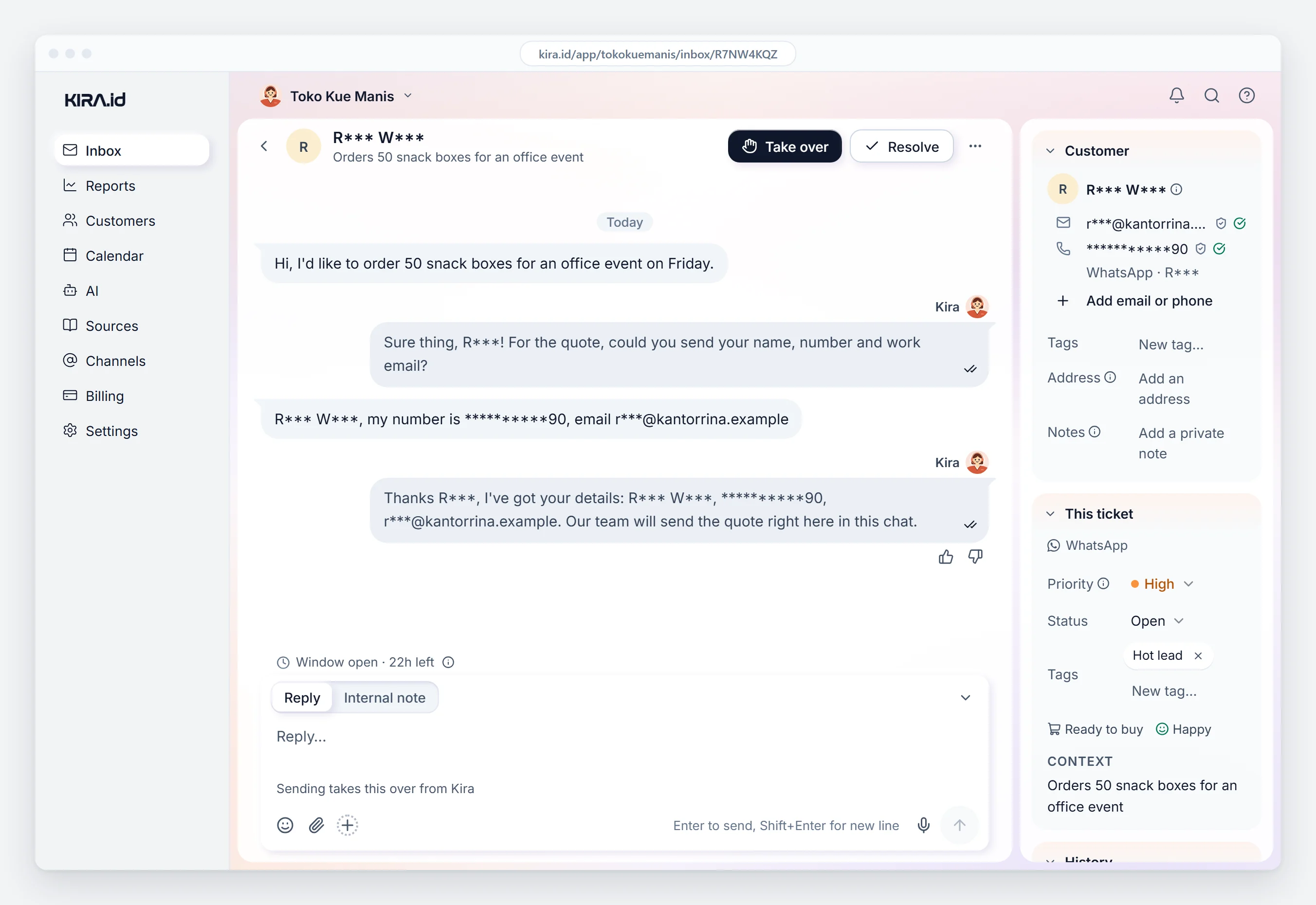
We keep the first letter of each word of a name and the last two digits of a number on purpose: enough to tell two customers or two numbers apart, too little to look someone up or to dial. The AI still greets the customer by name in its own replies; on the rep's screen that name is masked. Customers notice nothing, and Owners and Admins see everything as usual.
The part we're proudest of: the masking happens on our server, everywhere a number can show up, search included. Not one field covered while the number sits in plain sight in the AI's reply.
The next worry is always commission. In KIRA.id, every ticket carries one name under Handled by, and the info icon beside it says why that person got it. A returning customer usually goes back to whoever served them last, so the relationship a rep built still counts. A ticket nobody picks up within your Pick up within limit moves on to the next teammate. The details are in the who gets a ticket guide.
When a rep resigns, an Owner or Admin presses Remove member under Settings → Team. That person loses access, their open tickets go back to waiting for someone else, and customers keep messaging the same number. The numbers don't leave with them, because they were never on their screen.
| Reps on personal WhatsApp | Shared office phone | KIRA.id, switch on | |
|---|---|---|---|
| What the rep sees | Full numbers, on their own phone | Full numbers, in the phone's contacts | Masked, last two digits only |
| When a rep resigns | Customers and history leave too | Numbers may already be copied | Access removed, tickets back to waiting |
| Who served whom | Only the rep knows | Not recorded | One name per ticket, with the reason |
| Finding a customer by number | Anyone can | Anyone can | Not possible for Agents |
| Owner reads the chats | No | Only while holding the phone | Always |
These businesses are made up.
A property agency with five agents. Buyers from ads message the office number. The AI answers questions about locations and unit types from the sources the office wrote, and an agent takes over to book a viewing. When one agent joins a rival agency, their prospects keep messaging the office.
A car dealership. A customer who wants a test drive fills in their name, city and preferred model in a chat form. The rep checks the answers and sends an offer in the same chat. The Monday "that's my customer" argument is gone: the name on the ticket settles it.
A B2B packaging supplier. Buyers at factories and cafés reorder monthly over WhatsApp and usually reach the same rep, so the relationship holds. Their numbers just never land on the rep's phone.
Keep customer numbers off reps' personal phones from day one. Every chat comes in on the business number, reps reply from the console, and in KIRA.id customer numbers show masked for the Agent role.
Yes. Reps reply from the console, and the message goes out from your business WhatsApp number. Only the customer's number stays out of sight.
No. Stored messages are never changed; only what the rep's screen shows is masked.
That's for the employment contract and your lawyer, and it differs per contract. What you can control is whether the number ever reached them.
You don't have to suspect anyone to protect your business. Move conversations onto a number the business owns, give reps the right role, and turn on one switch before someone new joins. Details like a customer's city or budget can be collected inside the chat, as in our post on no longer copying customer contacts into a spreadsheet. The full steps are in the guide to hiding customer contact details from Agents. Want to see it working for your sales team? Tell us what you need.