English
English
How to follow up customers on WhatsApp without feeling like a chaser: when it's fair, what to write, and when to stay quiet. Plus KIRA.id's one-time follow-up.
Your thumb is hovering over send. The third message to the same buyer is typed: "So, are you taking the bag?" The first two still sit there with grey double ticks, unread, and you know exactly how it feels on the other end. Three notifications from one shop, every one of them a bill.
Here's where we stand, and we'll defend it at any dinner table: a good follow-up isn't about a sweeter sentence. It's about who is actually waiting on whom. If the customer is waiting on you (an answer, stock, a time slot), you owe them a move. If you're waiting on the customer, one polite nudge is fair. Everything else is better left alone, because silence is a kind of service too.
Before you type a word, ask one question: whose turn is it?
| What the chat looks like | Whose turn | What's fair |
|---|---|---|
| You asked "which size?" and got no answer | Customer | One short nudge |
| You sent a choice of times or colours, nothing tapped yet | Customer | One short nudge |
| The customer said "I'll transfer later" | Customer | One nudge, no pressure |
| The customer said thanks, the answer was complete | Nobody | Stay quiet. Let them go in peace |
| You promised "let me check the stock" | You | Don't follow up. Come back with the answer |
| The customer sounds upset | You | No cheerful nudge. Show up with an answer |
Row five gets forgotten most. Sending "Still interested?" to someone who's waiting on your stock check isn't a follow-up. It flips who owes whom.
We see the same three habits in almost every shop:
The window is explained in full in the 24-hour window and the free ad window. The short version: a free-form reply can only go out within 24 hours of the customer's last message. A well-timed follow-up isn't just politer, it's the only kind that can still arrive.
A good line has three ingredients: context (what you last talked about), a way out (they can say no), and one small step.
When your question went unanswered:
"Hi, I asked about the shoe size earlier. If you're not sure, just send the length of your foot and I'll help you pick."
When the customer hasn't chosen:
"I'm still holding those colours for you. If you'd like another look, just tap one."
When they said they'd transfer:
"I'll keep the order on hold. Once it's done, send the proof here and our team will check it."
Lines to throw away: "Hello?", "Waiting for your reply", "Why no answer?", and every version of "anything else I can help with?" sent to someone who just said thank you.
In KIRA.id a follow-up is one part of each channel's card under Channels → Social: Follow up quiet customers.
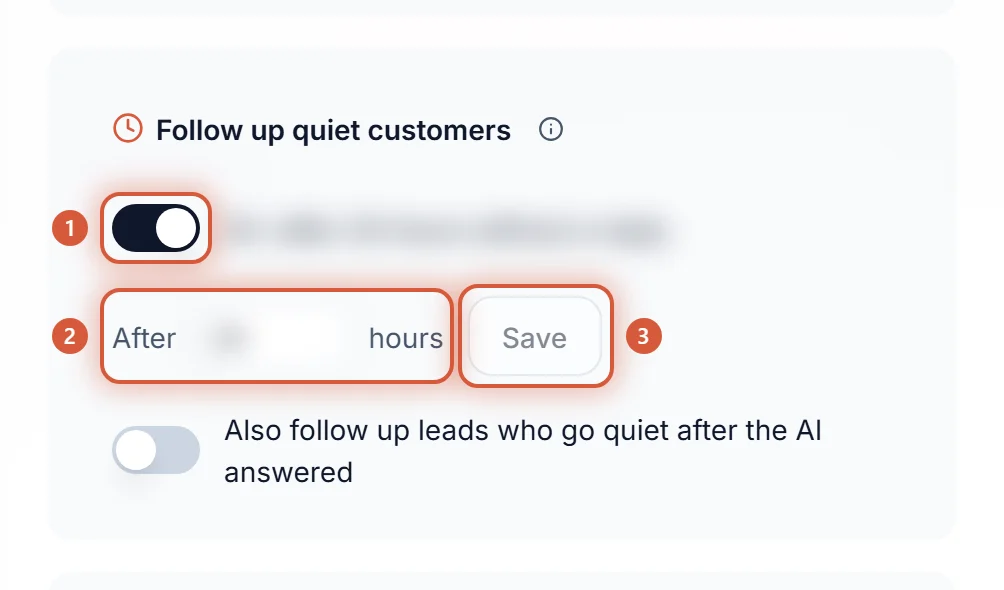
Switch it on, enter After how many hours a customer stays quiet, then Save. That one number applies to every channel. You don't write the message: the AI writes each follow-up for that chat, short and in the customer's language, recalling what they still owe (a size not picked yet, a transfer receipt not sent), without adding a new promise or time.
The part we're proudest of is the "when". After the wait, the AI reads the end of the conversation and chooses. If something is owed by the customer (a question unanswered, a choice untapped, a booking unconfirmed, or they said they'd be back), one follow-up goes out, and it simply asks whether they still need help. If they already got their answer and said thanks, nothing happens and the ticket finishes quietly. If the customer seems upset, no automatic nudge goes out.
If they stay quiet for one more wait, the ticket is resolved, with no rating card. If they reply at any point, the ticket opens again with its history intact.
On WhatsApp there's one extra condition: a follow-up only goes out while your number still has free messages, because Meta bills messages once the free allowance runs out. You can see the result under Reports → Speed → Go deeper:
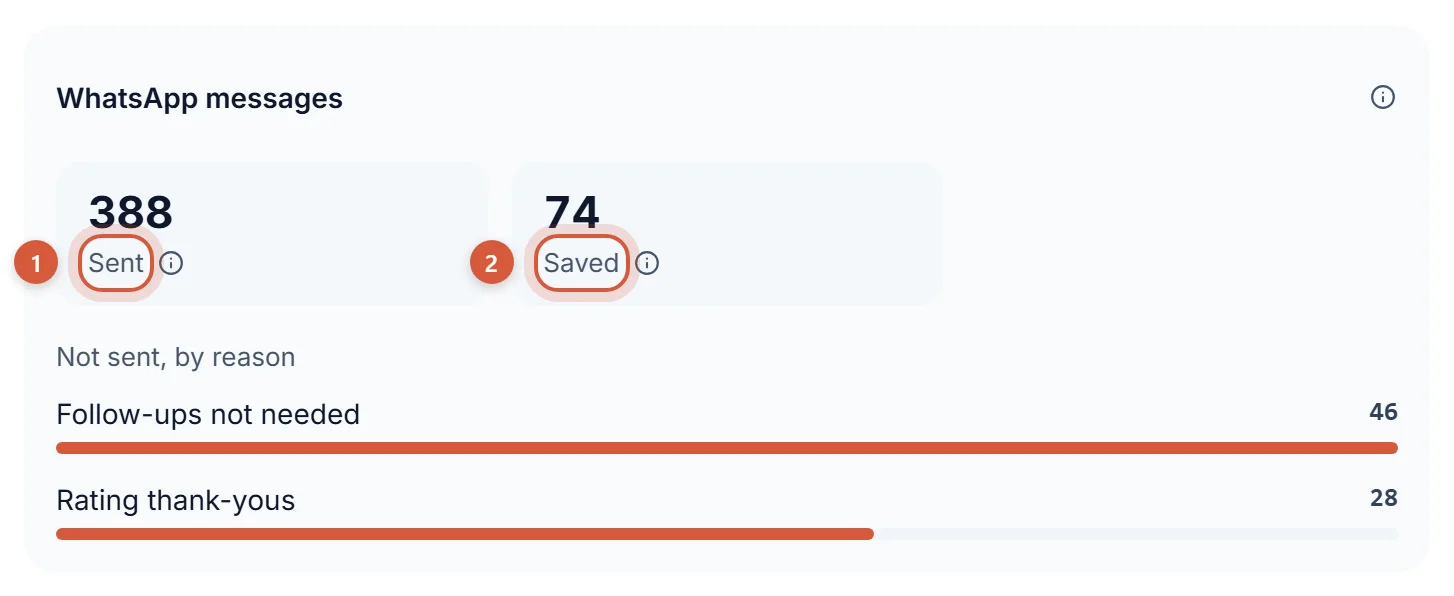
The Follow-up not needed row is a list of messages that didn't end up annoying your customers. Looking at it is quietly satisfying.
One honest note: it's an AI reading the conversation, so we can't promise a perfect decision every time. What we can promise is the failure path. If the decision can't be made, nothing happens and KIRA.id tries again next round. It never guesses.
| Manual follow-up | Broadcast to everyone | KIRA.id | |
|---|---|---|---|
| Who is contacted | Whoever you remember | Everyone | Only those we're waiting on |
| How many times | Depends on your mood | Often | Once, then the ticket closes quietly |
| Customers already happy | Sometimes nudged anyway | Always nudged | Left alone |
| Customers who are upset | Sometimes get a cheerful nudge | Included | No automatic greeting |
| Admin effort | Remembering and typing | Little, but high risk | None |
| Reach old customers gone quiet for a long time | Limited by the window rule | Needs a paid template | No: KIRA answers, it doesn't broadcast |
These examples are made up.
A batik shop in Solo. A buyer asks "is the blue Parang shirt still there?", the AI answers and offers sizes, and the buyer disappears. One follow-up, because the size choice hasn't been tapped. Another buyer who only asked about opening hours and replied "ok thanks" isn't nudged.
A cake shop with daily orders. A customer says "I'll transfer the deposit later". One gentle follow-up makes sense. The proof of transfer is still checked by a person on your team; the AI never declares anything paid.
A bag shop on a marketplace and Instagram. Marketplace buyers are out of KIRA's reach, because KIRA doesn't answer marketplace chats. What you can do is put your own chat link and WhatsApp in the thank-you card inside the parcel, so the next buyer lands somewhere you can serve.
Once, with a clear reason. If one nudge goes unanswered, assume they don't need you right now. That's also the KIRA.id rule: one follow-up, then the ticket finishes quietly.
After a sensible wait since the last reply, and while the 24-hour window is still open. KIRA.id sends a little early if your wait is longer than the time left in the window.
No. A ticket that finishes because the customer went quiet doesn't send a rating card.
No. KIRA.id doesn't broadcast and doesn't send marketing templates. It answers and follows up on conversations that are already running.
Open Channels → Social, tap the channel's card, switch follow-up on, and pick hours you'd be comfortable receiving as a buyer. The full rules are in the follow-ups and auto-resolve guide, and the costs in WhatsApp costs and free messages. To see why we don't just say hello, read automatic WhatsApp follow-ups: why we don't just check in, or the WhatsApp 24-hour window. Questions? Talk to our team.